

How to run the report:
Apply specific search filters to the attributes offered, including:Delivery Status: Delivered, Exception, In Transit, Returned, Shipped
# of Exceptions: 1, 2, 3+
Order Type: Club, Corporate Gift Order, Daily Order, Order Packing, Personalization Order
Start Date & End Date Once the query is run, a list of shipments that meet the requested criteria will populate. The list will include the order and shipment details, end-consumer information, and real-time delivery status. To the left of each shipment line is an expand (+) icon. Click this icon to expand and view the tracking record of that particular container/tracking ID:

How to read the report:
Once expanded, the report will show the tracking lifestyle of the container from its origin point of being shipped from the WineDirect Fulfillment facility through to its destination, including any changes made to the order - either by request from the client or consumer, or due to unsuccessful delivery attempts or other carrier updates: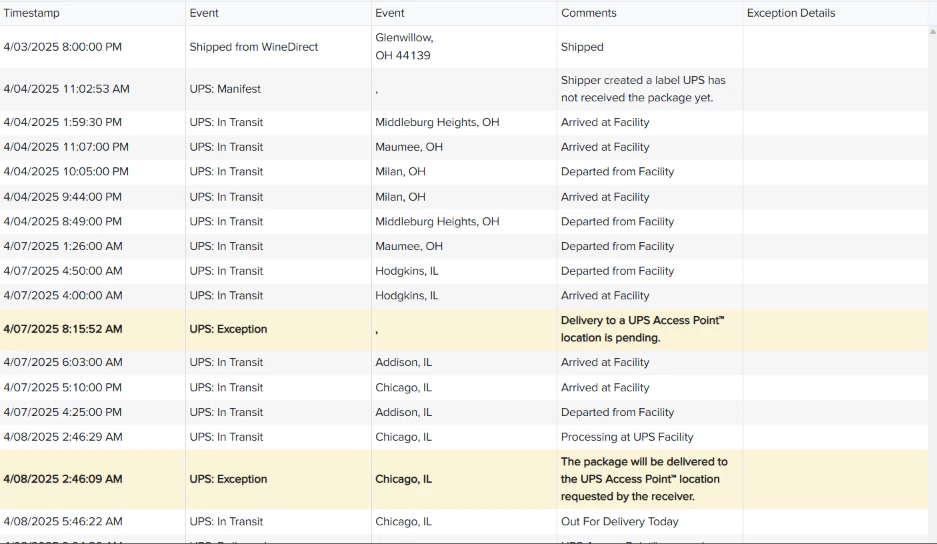
To ensure you are using this report to its fullest extent, the information here can also be exported via an Excel file.